

Solenura™
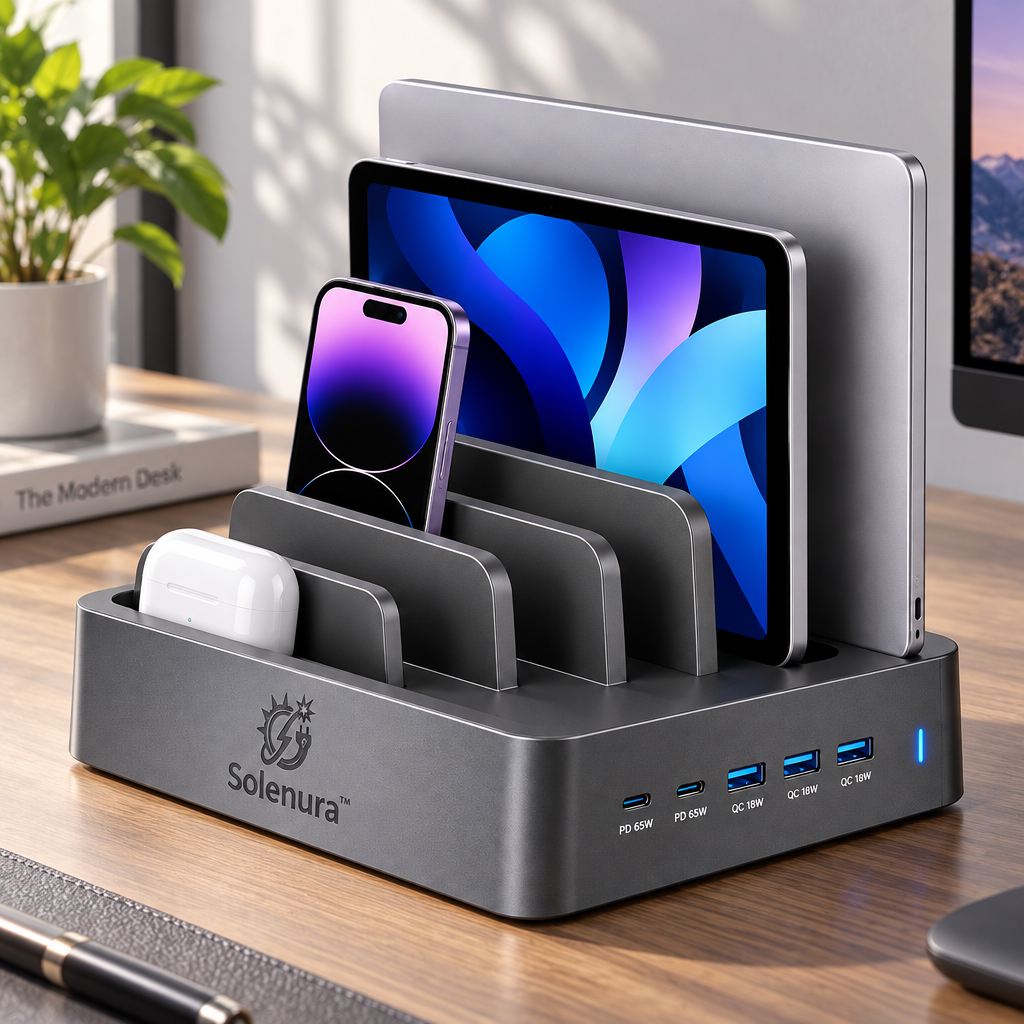
Solenura™ 5-Port Desktop Charging Station & Multi-Device Organizer – 2 USB-C PD 65W + 3 USB-A QC 18W Charging Dock for Laptops, Tablets, Phones & Everyday Tech
Solenura™ 5-Port Desktop Charging Station & Multi-Device Organizer – 2 USB-C PD 65W + 3 USB-A QC 18W Charging Dock for Laptops, Tablets, Phones & Everyday Tech
Couldn't load pickup availability
Bring Every Device Back to One Place
A laptop on one side of the desk. A tablet leaning against a monitor. A phone buried beneath charging cables. Earbuds somewhere between them.
The Solenura™ Desktop Charging Station & Multi-Device Organizer is designed to replace that scattered setup with one clean, dedicated charging hub.
Combining a multi-slot desktop organizer with five front-facing charging ports, this station gives laptops, tablets, smartphones, earbuds, and other compatible electronics a more organized place to rest while keeping charging connections within easy reach.
With 2 USB-C PD ports rated up to 65W and 3 USB-A QC ports rated up to 18W, you can connect a variety of compatible devices without covering your desk in individual wall adapters.
It is more than somewhere to plug in.
It is where your everyday technology belongs.
⚡ One Charging Hub for a Multi-Device Life
Most people no longer carry a single rechargeable device.
A normal desk may include:
💻 A laptop for work
📲 A tablet for entertainment or reading
📱 A smartphone
🎧 Wireless earbuds
⌚ Wearable accessories
🎮 Portable electronics
Using a separate charger for every device can quickly create a crowded power strip and a mess of loose cables.
Solenura™ helps consolidate that setup around one central desktop station.
Five Charging Connections
2 × USB-C PD Ports — Up to 65W Each
Designed for compatible higher-power USB-C devices such as laptops, tablets, smartphones, and other USB-C electronics.
3 × USB-A QC Ports — Up to 18W Each
Convenient for compatible phones, accessories, earbuds, and other USB-powered electronics.
This mixed-port configuration lets newer USB-C devices and existing USB-A accessories share one organized charging area.
Individual device charging speed depends on the connected device, cable, charging protocol, available output, battery level, and operating conditions. Total power distribution may vary when several devices are connected simultaneously.
🗂️ Storage and Charging in the Same Footprint
The built-in vertical dividers create dedicated spaces for different devices instead of allowing everything to pile up flat on your desk.
Arrange compatible devices such as:
💻 Laptop
📲 Tablet
📱 Smartphone
🎧 Earbud case
📓 E-reader or portable electronics
The upright layout helps make better use of vertical space, especially on smaller desks where every inch matters.
Instead of spreading multiple devices across the surface, you can keep them grouped together in one defined area.
✨ A Charging Station That Also Cleans Up the Desk
This product isn't designed only around wattage.
It's designed around what your workspace looks like after everything is plugged in.
By combining charging ports and device organization into one structure, Solenura™ helps reduce:
❌ Multiple charging bricks
❌ Devices stacked on top of each other
❌ Loose electronics across the desk
❌ Chargers hidden behind furniture
❌ Constantly searching for an available port
The result is a workspace that feels more intentional and easier to manage.

💻 Built for More Than Smartphones
A desktop charging station becomes much more useful when it can support the devices that actually dominate your workspace.
The USB-C PD connections provide charging options for compatible higher-power electronics, allowing the station to fit naturally into a laptop-and-tablet setup rather than functioning only as a phone charger.
Depending on device compatibility, use the station with:
💻 USB-C Laptops
Keep a compatible work or personal laptop upright while charging instead of leaving it flat across your workspace.
📲 Tablets
Store tablets vertically when not in use and keep their charging connection close.
📱 Smartphones
Give your phone a dedicated space instead of leaving it underneath other devices.
🎧 Everyday Accessories
Use the additional USB ports for compatible earbuds, wearables, portable speakers, and other rechargeable accessories.
🧹 Turn Cable Chaos Into a Routine
A well-organized charging setup creates a simple habit.
At the end of the day:
Put the laptop back.
Place the tablet in its slot.
Connect the phone.
Return the earbuds.
By morning, everything is located in one familiar area.
There is no need to remember where every device was left or which outlet has the correct charger.
One station becomes the reset point for your everyday electronics.
🏠 Designed for the Places Where Devices Gather
Multi-device charging isn't limited to a home office.
The Solenura™ station works naturally in different environments.
🖥️ Home Office
Keep work devices together without using half the desk for chargers.
🛏️ Bedroom
Create one central charging location for the electronics you use every day.
👨👩👧 Family Charging Area
Give household devices a dedicated place instead of leaving them around the kitchen or living room.
📚 Study Space
Organize a laptop, tablet, phone, and accessories inside a smaller workspace.
🏢 Office
Use one station to manage commonly carried electronics at a workstation.
🏨 Temporary Work Setup
Create a more organized charging environment when working away from your normal desk.

🔌 USB-C Meets USB-A
Not every device you own uses the same connector.
That is why having both USB-C and USB-A connections can be useful for a mixed-device household or workspace.
USB-C PD Ports
Designed for newer compatible electronics that can take advantage of USB-C Power Delivery.
Ideal for compatible:
💻 Laptops
📲 Tablets
📱 Smartphones
🎮 Portable electronics
USB-A QC Ports
Useful for existing USB-A charging cables and accessories.
Ideal for compatible:
🎧 Earbud cases
⌚ Wearable devices
📱 Smartphones
🔋 Small rechargeable electronics
This combination helps reduce the need to immediately replace every charging cable you already own.
⚡ Up to 65W Where Higher Power Matters
The USB-C ports are labeled for up to 65W PD charging, making them the higher-power connections on the station.
That additional capacity can be especially useful for compatible laptops and tablets that need more power than a standard phone charger typically provides.
However, charging wattage is not something the station forces into a device.
Compatible electronics communicate with the charger and draw power according to their supported charging requirements.
So a smaller phone does not simply receive the same power level as a laptop.
Charging performance can depend on:
- device specifications
- charging protocol
- USB cable capability
- number of devices charging simultaneously
- battery level
- temperature
- device activity during charging
📏 Use Vertical Space to Save Horizontal Space
Most charging systems spread devices outward.
Solenura™ organizes them upward.
The vertical divider layout allows several devices to occupy a relatively concentrated area of the desk.
That makes the station especially useful if you work with:
🖥️ A smaller desk
🏠 A compact home office
📚 A crowded study area
🏢 A shared workstation
🛏️ A narrow bedside surface
When devices are stored vertically, more of the surrounding surface remains available for work, writing, coffee, books, or whatever else belongs on your desk.
🛡️ Designed for Everyday Charging Reliability
Multi-device charging equipment can remain connected throughout the day, so dependable charging management matters.
The Solenura™ station is designed with everyday charging protection in mind to help support stable operation for compatible devices under normal use.
For a better charging experience:
✓ Use suitable charging cables.
✓ Confirm that connected devices support the corresponding charging protocols.
✓ Keep ventilation areas clear.
✓ Keep liquids away from the charging station.
✓ Avoid placing the station in excessive heat.
✓ Inspect cables regularly for visible damage.
✓ Do not insert foreign objects into charging ports.
✓ Place heavier devices securely in an appropriately sized slot.
🧱 Stable, Purpose-Built Desktop Design
A multi-device organizer needs more than charging ports.
It needs to provide a dependable physical place for the electronics resting inside it.
The broad rectangular base and separated vertical slots create a stable-looking desktop structure, while the dark metallic-style finish gives the station a more substantial appearance than a basic plastic charging block.
Its low, horizontal base keeps controls and ports easy to access from the front while devices remain stored vertically above.
The design balances three functions:
Power — accessible charging ports.
Storage — organized device slots.
Workspace — less equipment spread across the desk.
🌅 From First Login to End-of-Day Reset
Morning
Pick up your phone, tablet, and laptop from one central location.
Workday
Return devices to the organizer when they are not being used.
Afternoon
Top up batteries without searching for individual adapters.
Evening
Bring frequently used electronics back to their dedicated slots.
Overnight
Keep devices collected in one location so the next day starts more organized.
Solenura™ doesn't just change where your devices charge.
It helps create a repeatable place for them to return to.
✅ Product Highlights
⚡ Five Charging Ports
Two USB-C PD connections and three USB-A QC connections provide multiple ways to charge compatible electronics.
💻 Up to 65W USB-C PD
Designed to support compatible higher-power USB-C devices.
🔌 Up to 18W USB-A QC
Convenient additional ports for compatible everyday electronics.
🗂️ Integrated Device Organizer
Vertical slots help keep laptops, tablets, phones, and accessories together.
📐 Space-Saving Layout
Uses vertical storage to reduce the amount of desktop area occupied by devices.
🧹 Cleaner Charging Setup
Helps consolidate multiple adapters and charging locations.
🏠 Home & Office Friendly
Suitable for workspaces, bedrooms, study areas, and family charging stations.
✨ Modern Dark Finish
A professional appearance designed to fit contemporary technology setups.
📌 Compatibility Notes
Before purchasing, check the charging requirements and physical dimensions of the devices you plan to use.
Please Note:
- USB-C PD charging requires compatible devices and suitable cables.
- USB-A QC charging requires compatible equipment to achieve supported fast-charging speeds.
- Larger or unusually thick devices may not fit every storage slot.
- Protective cases may increase device thickness.
- Charging speed can change when several devices are connected simultaneously.
- Some high-performance laptops may require more than 65W for their maximum charging rate.
- The station should be used on a stable, dry, level surface.
💡 Suggested Setup
For a clean everyday arrangement:
Rear Slot
💻 Laptop
Middle Slots
📲 Tablet or e-reader
Front Slots
📱 Smartphone + smaller electronics
Front USB-C Ports
⚡ Higher-power compatible devices
Front USB-A Ports
🔌 Phones and smaller accessories
This creates an intuitive system where larger devices stay toward the back and frequently accessed electronics remain toward the front.

Less Searching. Less Clutter. More Ready-to-Go Devices.
Charging several devices should not require several different corners of the room.
The Solenura™ Desktop Charging Station & Multi-Device Organizer turns one section of your desk into a dedicated destination for the technology you use throughout the day.
Charge your laptop.
Store your tablet.
Keep your phone within reach.
Give your smaller accessories a place to return to.
And when tomorrow starts, everything is where you expect it to be.
Bring Your Devices Together. Keep Your Space Moving Forward.